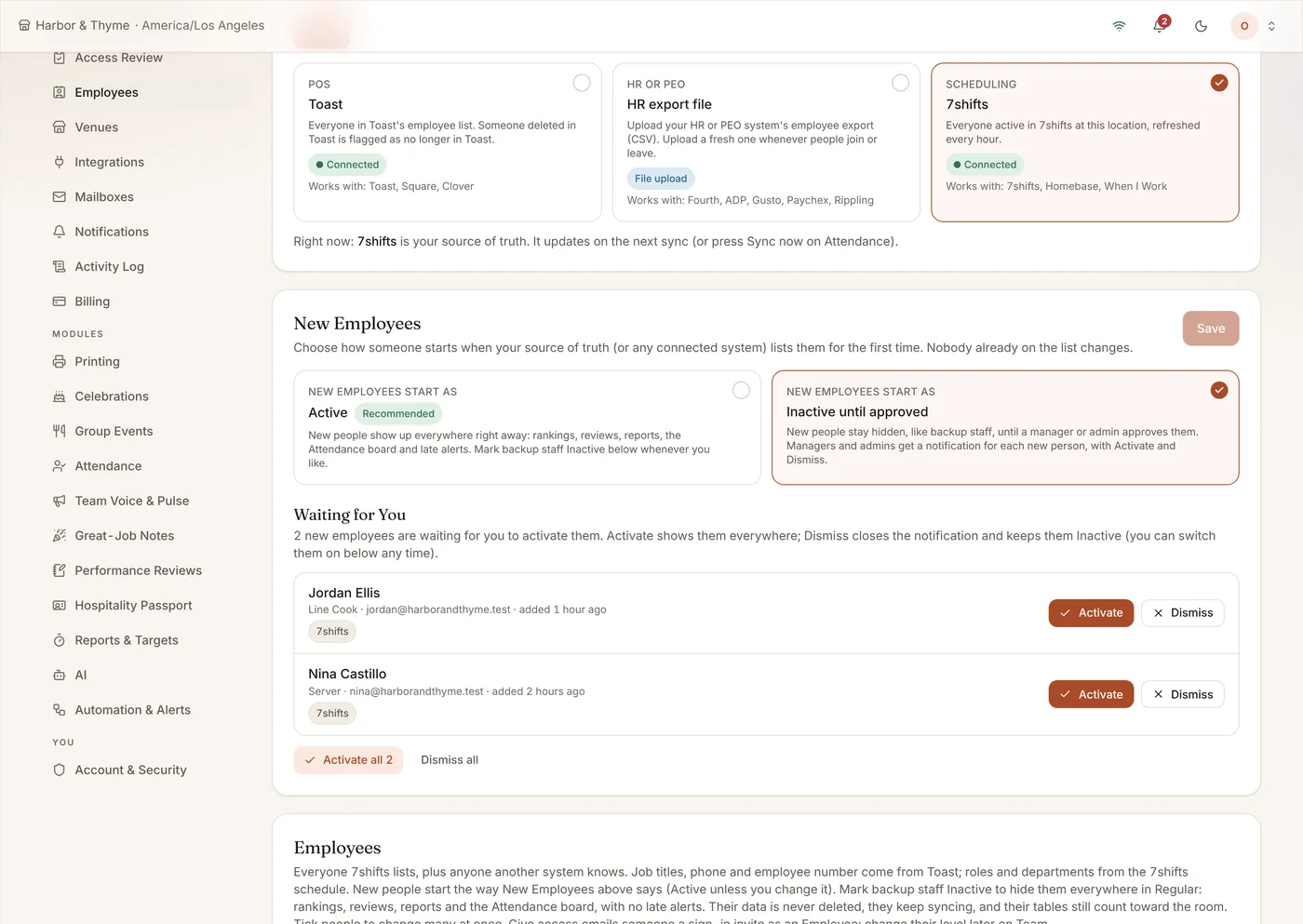
Your schedule, your POS and your payroll each have their own list of employees, and they never quite agree. Regular lets you pick which one is the source of truth for each venue, and links the others to it.
What It Does
- Pick the system that decides who works here
- 7shifts, Toast or an HR export (ADP, Gusto, Paychex and more)
- New hires start active, or wait for a manager’s approval
- Activate or dismiss each new person from the bell, Home or Settings
- Mark many people active or inactive at once
- Invite the whole team in one go
Who It Helps
For the Restaurant
- One list of who works here, from the system you choose
- New hires go live right away, or wait for a manager’s OK
- Badges show who is missing from the source or has left it
- Invite the whole team in one go
For Your Team
- Invited with the right role on day one
- With approval on, no rankings or late alerts before a manager confirms them
- Leavers are hidden everywhere, not just on one screen
- Their profile matched across schedule, POS and payroll
How It Pays for Itself
Fewer roster mistakes, less admin
Picking one source and linking the rest ends the weekly job of reconciling three employee lists by hand.
Example: saving an hour a week of roster clean-up at $35 an hour is about $150 a month.
Examples use round numbers to show the arithmetic. They are not a promise of results; your own numbers will differ. Try it with your numbers.
You Pick the Source
Choose scheduling (7shifts), POS (Toast) or an HR or PEO export file. Only the source adds people; the other systems link their records and fill gaps. Badges show who is missing from the source or has left it.
New Hires: Live Right Away or After Your OK
When your source lists someone for the first time, you decide what happens next. By default they start active and show up everywhere right away. Or set a venue to Inactive until approved: new people stay hidden from rankings, reviews, reports, the Attendance board and late alerts until a manager or admin activates them. Each new person raises a notification on the bell, on Home and in Settings, with Activate and Dismiss. Nobody already on your list changes when you switch.
Bulk Changes and Fast Invites
Tick as many people as you like and mark them active or inactive, or give them access, in one step. Inviting everyone goes out in batches with progress, and one bad address no longer stops the rest.
Active Means Active Everywhere
The active or inactive flag applies across Regular, so people who have left are hidden everywhere, not just in one screen.
How It Works
- Choose the source for each venue.
- Regular links Toast, 7shifts and HR records.
- Choose whether new hires start active or wait for approval.
- Review who is missing or has left.
- Invite the team.
Frequently Asked Questions
Which HR exports work?
Exports in the style of Fourth, ADP, Gusto and Paychex, uploaded as a CSV.
Can new hires wait for approval before they show up?
Yes. Each venue can set new employees to start Inactive until approved. Managers and admins then get a notification inside Regular for each new person, with Activate and Dismiss. The default is Active, so nothing changes unless you choose it.
Does turning approval on hide anyone already on the list?
No. Only people who appear for the first time after you turn it on start Inactive. Everyone already on the list stays as they are.